Paint Club Colour Visualiser

See Your Colour Before You Paint

Choosing the right paint colour can feel overwhelming. A colour card in-store or a small paint swatch often doesn’t tell the full story once the colour is on your walls, in your lighting, and surrounded by your furniture and décor.

The new Paint Club Colour Visualiser changes that.

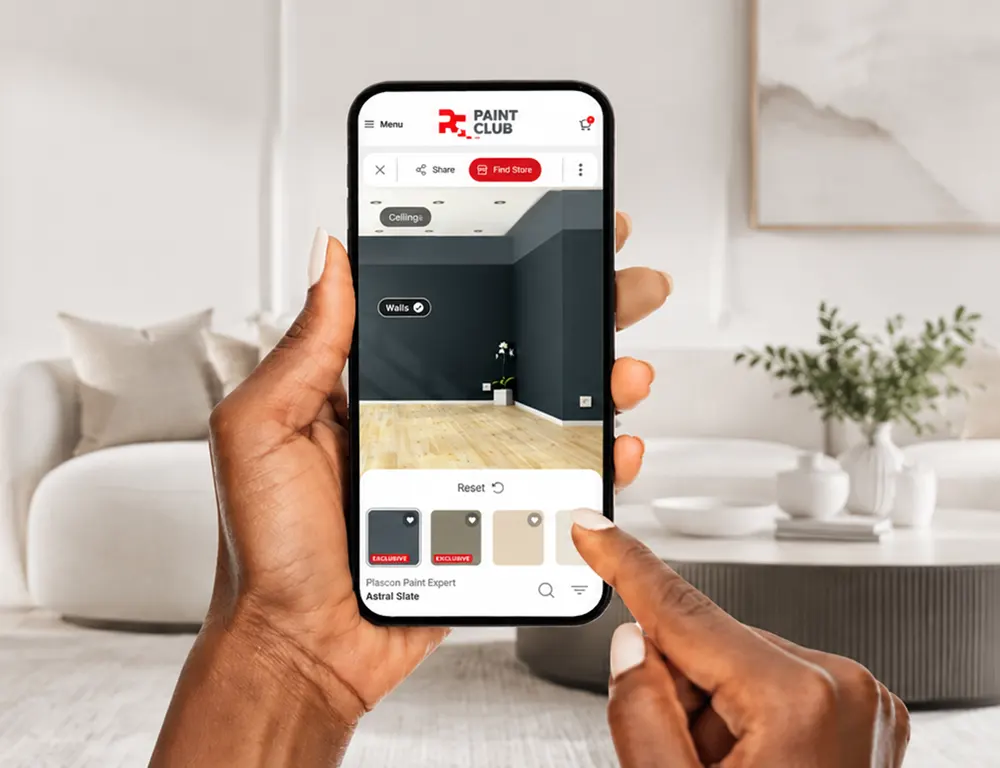
Our online paint visualiser tool allows you to upload a photo of your own room or home and instantly test colours on your walls before you buy paint. You can also experiment using professionally styled inspiration rooms if you simply want to explore colour ideas and trends.

Whether you’re repainting a bedroom, planning a full home renovation, refreshing an exterior wall, or helping a client choose the perfect palette, the Paint Club Colour Visualiser helps you make more confident colour decisions.

Explore our exclusive Bespoke Colour Collection alongside some of the most popular shades from the Plascon Essential Collection - all from your desktop, tablet, or mobile device.

Disclaimer: Colours shown in the Paint Expert Colour Visualiser are digital representations and may vary depending on your screen settings, lighting conditions and the quality of your uploaded image. We recommend viewing a physical colour sample and consulting your nearest authorised Paint Expert store before making your final colour selection.

Disclaimer: Colours shown in the Paint Expert Colour Visualiser are digital representations and may vary depending on your screen settings, lighting conditions and the quality of your uploaded image. We recommend viewing a physical colour sample and consulting your nearest authorised Paint Expert store before making your final colour selection.

Paint Club Colour Visualiser

See Your Colour Before You Paint

Choosing the right paint colour can feel overwhelming. A colour card in-store or a small paint swatch often doesn’t tell the full story once the colour is on your walls, in your lighting, and surrounded by your furniture and décor.

The new Paint Club Colour Visualiser changes that.

Our online paint visualiser tool allows you to upload a photo of your own room or home and instantly test colours on your walls before you buy paint. You can also experiment using professionally styled inspiration rooms if you simply want to explore colour ideas and trends.

Whether you’re repainting a bedroom, planning a full home renovation, refreshing an exterior wall, or helping a client choose the perfect palette, the Paint Club Colour Visualiser helps you make more confident colour decisions.

Explore our exclusive Bespoke Colour Collection alongside some of the most popular shades from the Plascon Essential Collection - all from your desktop, tablet, or mobile device.

Why Use a Paint Colour Visualiser?

Paint colours can look dramatically different depending on:

Natural Light

Room Size

Surrounding Décor

Flooring

Ceilings

Direction Your Room Faces

Our virtual paint colour tool allows you to:

Compare Different Shades Side-by-side

Experiment With Feature Walls

Save Your Favourite Combinations

Avoid Costly Colour Mistakes

Visualise Your Room in Minutes

Using the Paint Club Colour Visualiser is simple.

Upload Your Own Room

Take a photo of your lounge, bedroom, kitchen, bathroom, office, exterior wall, or any space you want to repaint. The tool automatically detects the paintable wall areas so you can instantly apply colour and preview the transformation.

Or Use Inspiration Rooms

Not ready to upload your own image yet? Browse pre-loaded room scenes to test colours and gather inspiration.

Try Exclusive Bespoke Colours

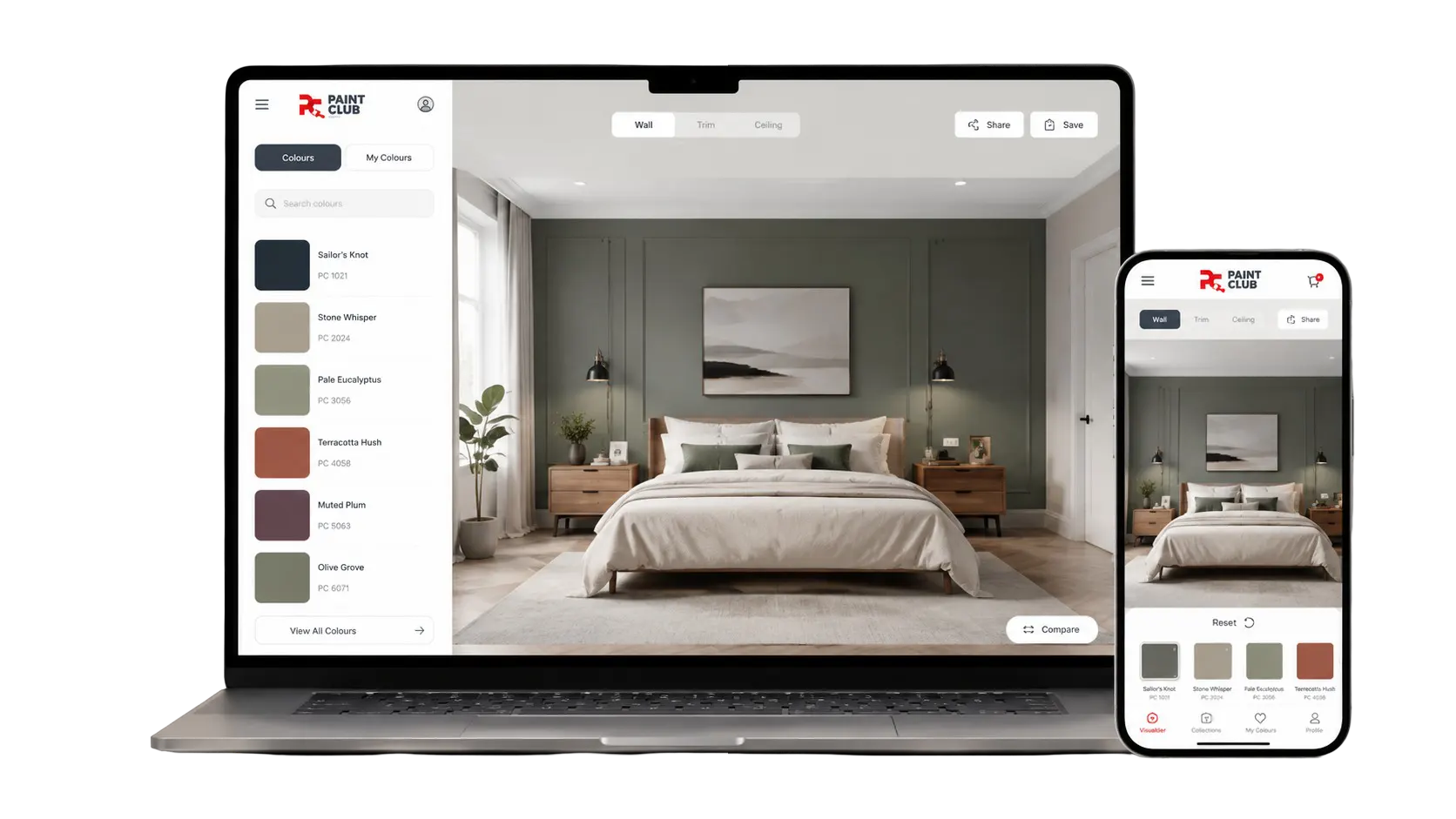
The visualiser has been specially designed to showcase the Paint Club Bespoke Colour Collection - a curated range of exclusive colours available only through authorised Plascon Paint Expert stores nationwide. You can also explore a selection of the most popular Plascon Essential Collection colours to compare timeless favourites alongside our trend-driven Bespoke shades.
Disclaimer: Colours shown in the Paint Expert Colour Visualiser are digital representations and may vary depending on your screen settings, lighting conditions and the quality of your uploaded image. We recommend viewing a physical colour sample and consulting your nearest authorised Paint Expert store before making your final colour selection.

Visualise Your Room in Minutes

Using the Paint Club Colour Visualiser is simple.

Upload Your Own Room

Take a photo of your lounge, bedroom, kitchen, bathroom, office, exterior wall, or any space you want to repaint. The tool automatically detects the paintable wall areas so you can instantly apply colour and preview the transformation.

Or Use Inspiration Rooms

Not ready to upload your own image yet? Browse pre-loaded room scenes to test colours and gather inspiration.

Try Exclusive Bespoke Colours

The visualiser has been specially designed to showcase the Paint Club Bespoke Colour Collection - a curated range of exclusive colours available only through authorised Plascon Paint Expert stores nationwide. You can also explore a selection of the most popular Plascon Essential Collection colours to compare timeless favourites alongside our trend-driven Bespoke shades.

Disclaimer: Colours shown in the Paint Expert Colour Visualiser are digital representations and may vary depending on your screen settings, lighting conditions and the quality of your uploaded image. We recommend viewing a physical colour sample and consulting your nearest authorised Paint Expert store before making your final colour selection.

Designed for South African Homes

South African light is unique. The same paint colour can appear warmer, cooler, brighter, or softer depending on your environment and architecture.

The Paint Club Colour Visualiser helps homeowners, decorators, architects, contractors, and DIYers better understand how colour may appear in real-world South African spaces before committing to a final choice.

Whether your style is:

  • Modern minimalist, 
  • Warm contemporary, 
  • Coastal calm, 
  • Earthy bushveld-inspired, 
  • Classic neutral, 
  • Industrial, 
  • or bold and expressive, 

the visualiser helps you experiment with confidence.

Disclaimer: Colours shown in the Paint Expert Colour Visualiser are digital representations and may vary depending on your screen settings, lighting conditions and the quality of your uploaded image. We recommend viewing a physical colour sample and consulting your nearest authorised Paint Expert store before making your final colour selection.

Designed for South African Homes

South African light is unique. The same paint colour can appear warmer, cooler, brighter, or softer depending on your environment and architecture.

The Paint Club Colour Visualiser helps homeowners, decorators, architects, contractors, and DIYers better understand how colour may appear in real-world South African spaces before committing to a final choice.

Whether your style is:

  • Modern minimalist, 
  • Warm contemporary, 
  • Coastal calm, 
  • Earthy bushveld-inspired, 
  • Classic neutral, 
  • Industrial, 
  • or bold and expressive, 

the visualiser helps you experiment with confidence.

Disclaimer: Colours shown in the Paint Expert Colour Visualiser are digital representations and may vary depending on your screen settings, lighting conditions and the quality of your uploaded image. We recommend viewing a physical colour sample and consulting your nearest authorised Paint Expert store before making your final colour selection.

Frequently Asked Questions

What can I paint in the Colour Visualiser?

The visualiser is designed to detect walls and ceilings within your image so you can apply paint colours directly to those surfaces for a realistic preview.

Can I test different colours on different walls?

Yes. If your image includes multiple walls, you can apply different colours to separate walls to compare combinations, feature walls, or contrasting tones.

Can I visualise trims, skirtings, doors, or window frames?

At this stage, the tool focuses primarily on walls and ceilings. Some smaller trim areas may not be detected accurately.

Can I upload my own room photo?

Yes. You can upload photos directly from your desktop, tablet, or mobile device. For the best results, use a clear, well-lit image where the walls are clearly visible.

Can I use the Colour Visualiser on my phone?

Yes. The Paint Club Colour Visualiser is mobile-friendly and works across desktop, tablet, and smartphone devices.

Do I need an account to use the visualiser?

No. You can use the tool without creating an account.

Can I save or download my visualised room?

Yes. You can save, download, and share your visualised colour combinations for future reference or comparison.

Can I share my colour designs with family or clients?

Yes. Downloaded visualisations can easily be shared with partners, decorators, clients, contractors, or friends to help with decision-making.

Are the paint colours shown in the visualiser completely accurate?

The colours displayed are digital representations and may vary depending on your device screen, brightness settings, lighting conditions, and the quality of the uploaded image.

We always recommend testing your chosen paint colour with a physical sample before finalising your purchase.

Why does the colour look different in my uploaded room image?

Lighting plays a major role in how colour appears. Shadows, warm lighting, direct sunlight, reflective surfaces, image quality and screen resolution can all influence the digital preview.

For the most realistic result:

  • use natural lighting where possible, 
  • avoid blurry images, 
  • and photograph the room from a straight-on angle.
Can I undo or change colours if I make a mistake?

Yes. The visualiser allows you to adjust and change colours easily while experimenting with different combinations.

What if the wall detection is not perfect?

The visualiser is designed to detect most wall surfaces automatically. In some cases, manual adjustment tools may help refine the selected area.

Can I buy the paint colours I’ve chosen?

Yes. Once you’ve selected colours you love, visit your nearest authorised Plascon Paint Expert store for professional advice and product recommendations.

What types of paint colours are available in the visualiser?

The tool includes:

  • the exclusive Paint Club Bespoke Colour Collection, 
  • and a curated selection of popular Plascon Essential Collection colours.
Is the Colour Visualiser safe to use?

Yes. The tool only accesses the specific images you choose to upload. It does not access other photos or personal information stored on your device.

Frequently Asked Questions

What can I paint in the Colour Visualiser?

The visualiser is designed to detect walls and ceilings within your image so you can apply paint colours directly to those surfaces for a realistic preview.

Can I test different colours on different walls?

Yes. If your image includes multiple walls, you can apply different colours to separate walls to compare combinations, feature walls, or contrasting tones.

Can I visualise trims, skirtings, doors, or window frames?

At this stage, the tool focuses primarily on walls and ceilings. Some smaller trim areas may not be detected accurately.

Can I upload my own room photo?

Yes. You can upload photos directly from your desktop, tablet, or mobile device. For the best results, use a clear, well-lit image where the walls are clearly visible.

Can I use the Colour Visualiser on my phone?

Yes. The Paint Club Colour Visualiser is mobile-friendly and works across desktop, tablet, and smartphone devices.

Do I need an account to use the visualiser?

No. You can use the tool without creating an account.

Can I save or download my visualised room?

Yes. You can save, download, and share your visualised colour combinations for future reference or comparison.

Can I share my colour designs with family or clients?

Yes. Downloaded visualisations can easily be shared with partners, decorators, clients, contractors, or friends to help with decision-making.

Are the paint colours shown in the visualiser completely accurate?

The colours displayed are digital representations and may vary depending on your device screen, brightness settings, lighting conditions, and the quality of the uploaded image.

We always recommend testing your chosen paint colour with a physical sample before finalising your purchase.

Why does the colour look different in my uploaded room image?

Lighting plays a major role in how colour appears. Shadows, warm lighting, direct sunlight, reflective surfaces, image quality and screen resolution can all influence the digital preview.

For the most realistic result:

  • use natural lighting where possible, 
  • avoid blurry images, 
  • and photograph the room from a straight-on angle.
Can I undo or change colours if I make a mistake?

Yes. The visualiser allows you to adjust and change colours easily while experimenting with different combinations.

What if the wall detection is not perfect?

The visualiser is designed to detect most wall surfaces automatically. In some cases, manual adjustment tools may help refine the selected area.

Can I buy the paint colours I’ve chosen?

Yes. Once you’ve selected colours you love, visit your nearest authorised Plascon Paint Expert store for professional advice and product recommendations.

What types of paint colours are available in the visualiser?

The tool includes:

  • the exclusive Paint Club Bespoke Colour Collection, 
  • and a curated selection of popular Plascon Essential Collection colours.
Is the Colour Visualiser safe to use?

Yes. The tool only accesses the specific images you choose to upload. It does not access other photos or personal information stored on your device.

Start Exploring Colour

Whether you’re planning a dramatic transformation or simply exploring ideas for your next project, the Paint Club Colour Visualiser makes colour selection easier, faster, and more inspiring.

Upload your room, explore colour, and visualise your next project today.

Disclaimer: Colours shown in the Paint Expert Colour Visualiser are digital representations and may vary depending on your screen settings, lighting conditions and the quality of your uploaded image. We recommend viewing a physical colour sample and consulting your nearest authorised Paint Expert store before making your final colour selection.

Start Exploring Colour

Whether you’re planning a dramatic transformation or simply exploring ideas for your next project, the Paint Club Colour Visualiser makes colour selection easier, faster, and more inspiring.

Upload your room, explore colour, and visualise your next project today.

Disclaimer: Colours shown in the Paint Expert Colour Visualiser are digital representations and may vary depending on your screen settings, lighting conditions and the quality of your uploaded image. We recommend viewing a physical colour sample and consulting your nearest authorised Paint Expert store before making your final colour selection.